How Continuous Cup works
From first entry to final result
One connected workflow keeps organizers, judges, entries, and results in sync.
Step 1 · Intake
Collect entries
Open a public entry page, or check people in at the door.
- Public or staff-assisted entry
- Divisions, caps, and payment status

Step 2 · Judging
Judges score on their own devices
Judges use your rubric on any phone, tablet, or laptop.
- Balanced assignments
- Blind judging when you need it

Step 3 · Review
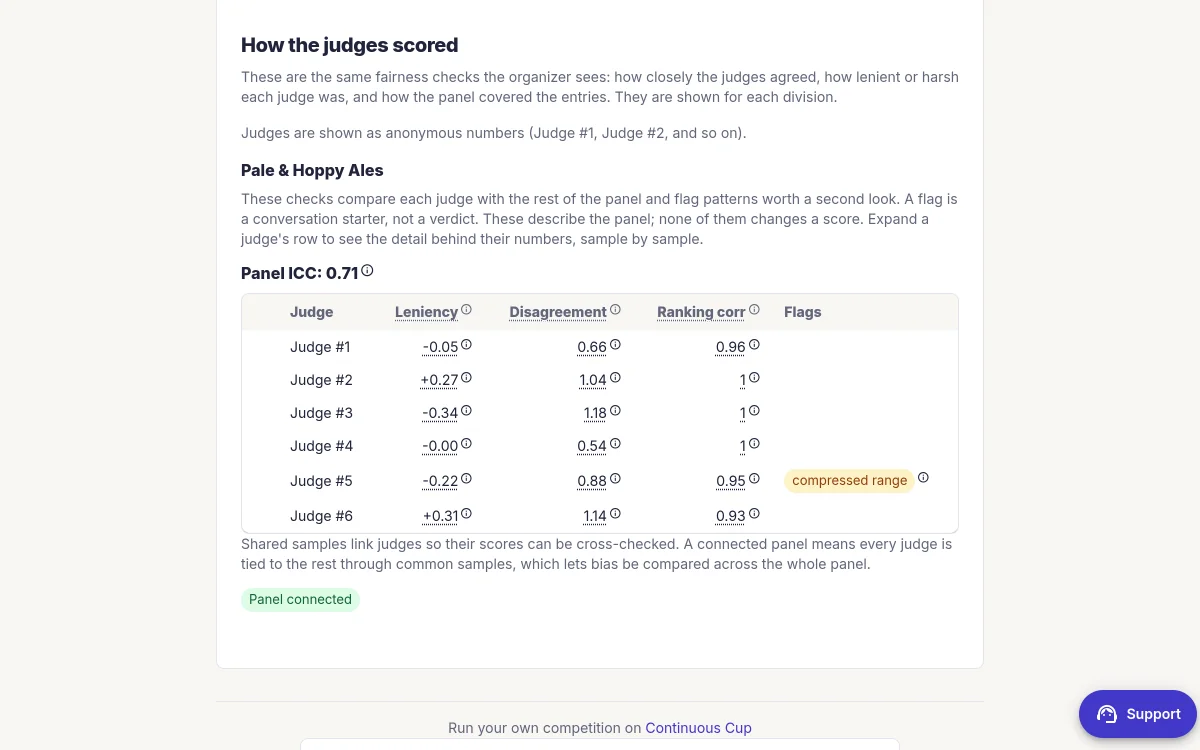
Review the judging evidence
See where judges disagreed and whether shared judging supports a close result.
- Panel agreement and drift checks
- Resolve issues before publishing

Step 4 · Results
Publish results with receipts
Share the standings and keep the audit trail behind them.
- Shareable standings
- Frozen analysis and audit trail
Everything stays connected
Organizers stay in control
See entries, assignments, progress, and exceptions from one workspace.
Judges stay focused
Each judge sees the entries and rubric they need on their own device.
Results keep their receipts
Published standings retain the scoring record and panel analysis behind them.
Ready to see it in action?
Explore the demo without creating an account, or start your first competition free.